Presets for any roleplay: Worldhopper for cloud models, and Outrider for local ones. The Worldhopper Engine extension adds possession, body swaps, mind control, hive minds, dolls, time stops, and every other way to roleplay metaphysics.
A modular Chat Completion preset: prose-first, adult-capable, and assembled from toggles you mix per chat. One preset for Claude, Gemini, DeepSeek, GLM, Kimi, and MiMo: a block meant for some models starts with a mark for each of them (✴️ Claude, ♊ Gemini, 🐋 DeepSeek, 🧭 GLM, 🌙 Kimi, 🌾 MiMo), so you switch on the ones with your model's mark and off the rest.
Or skip that and grab your model's own preset below. Each holds only its model's blocks, samplers included, and none of them touch your connection or model.
New in 1.4: Prose Habits in place of the banned lists, so the model gets what to write instead · people you walk away from stay behind and keep living · a who's-here line in ✚ Scene Anchor, which is now on by default · ✚ Swipe Feedback, so a swipe tries something different · ✚ OOC Memory, so standing directions stick · new options: ➃ POV: Hybrid, ✚ Dialogue Delivery, ✚ Montage, ✚ In Media Res, two Senses, and the Farce and Eerie lenses · ✚ Slutty Prose and Style Lens: Smut are now one block, ✚ Style Lens: Coz, so switch it on if you used them · and ✚ Lines & Veils is gone, so save your lists if you filled them in.
Everything is explained inside, in the preset's first block (✦ README, keep it off). One setting matters for every model: set Prompt Post-Processing to Semi-strict (no tools). The regex comes bundled; standalone copies are under Regex.
For Local Models · 1.0
OutriderPRESETS
Roleplay presets for the models you run on your own graphics card: Gemma, Mistral, Llama, and Qwen, in Text Completion with KoboldCpp. They're small on purpose. A local model follows a short prompt in plain sentences far more closely than a long one, so that's what it gets.
A short set of plain rules that small and mid-size models actually follow. The download has the system prompt, both sampler presets, the two templates, a KoboldCpp config per model, and the setup guide.
A much larger rule set, compressed, for models that can carry it. The download has the system prompt, the sampler preset, a Chat Completion version with every block as a switch, the template, the KoboldCpp config, and the setup guide.
Bans and samplers run in KoboldCpp, at no token cost.
Thinking is off, so replies start right away.
Pick your model
Each row is what to select in SillyTavern for that model. The card sizes are estimates.
Model
Card
System prompt
Sampler preset
Instruct template
Context template
Context
Gemma 4 31B
24 GB and up
Outrider Heavy
Outrider Heavy - Samplers
Gemma 4 WH *
Gemma 4
32K
Gemma 4 12B
12 to 16 GB
Outrider
Outrider - Samplers
Gemma 4 WH *
Gemma 4
16K
Gemma 4 E4B
6 to 8 GB
Outrider
Outrider - Samplers
Gemma 4
Gemma 4
16K
Mistral Small 3.2 24B
16 to 24 GB
Outrider
Outrider Mistral - Samplers
Mistral V7-Tekken
Mistral V7-Tekken
16K
Mistral Nemo 12B
8 to 12 GB
Outrider
Outrider Mistral - Samplers
Mistral V3-Tekken
Mistral V3-Tekken
16K
Llama 3.1 8B
6 to 8 GB
Outrider
Outrider - Samplers
Llama 3 Instruct
Llama 3 Instruct
16K
Qwen3.5-9B
8 to 12 GB
Outrider
Outrider - Samplers
ChatML WH Qwen *
ChatML
16K
Qwen3.8-27B
24 GB
Outrider
Outrider - Samplers
ChatML WH Qwen *
ChatML
16K
* Comes in the download's templates folder. The others ship with SillyTavern.
Setting it up
Start KoboldCpp with your model's config from the koboldcpp folder: Load Config, then pick your model file. On a smaller card, lower the context there and in SillyTavern to match.
Connect SillyTavern to KoboldCpp under Text Completion.
Open Advanced Formatting (the A icon). Import the System Prompt file from the sysprompt folder, pick the Instruct and Context templates from your model's row, and turn Instruct Mode on.
Import the sampler preset your row names, from TextGen Settings. When SillyTavern asks whether to allow its regex scripts, allow them: they turn the explicit wording on and off.
Built on stock models, not finetunes. A finetune should work with its base model's row. There are no jailbreaks, so a stock model that refuses something will still refuse it. One tip: put lorebook entries after the character card, or the model rereads most of the prompt every turn.
The part a preset can't do. Tell it what kind of metaphysics a character uses, and it keeps the rules, the bodies, and the prose straight in that character's chats. It pairs with the presets above and works with any other.
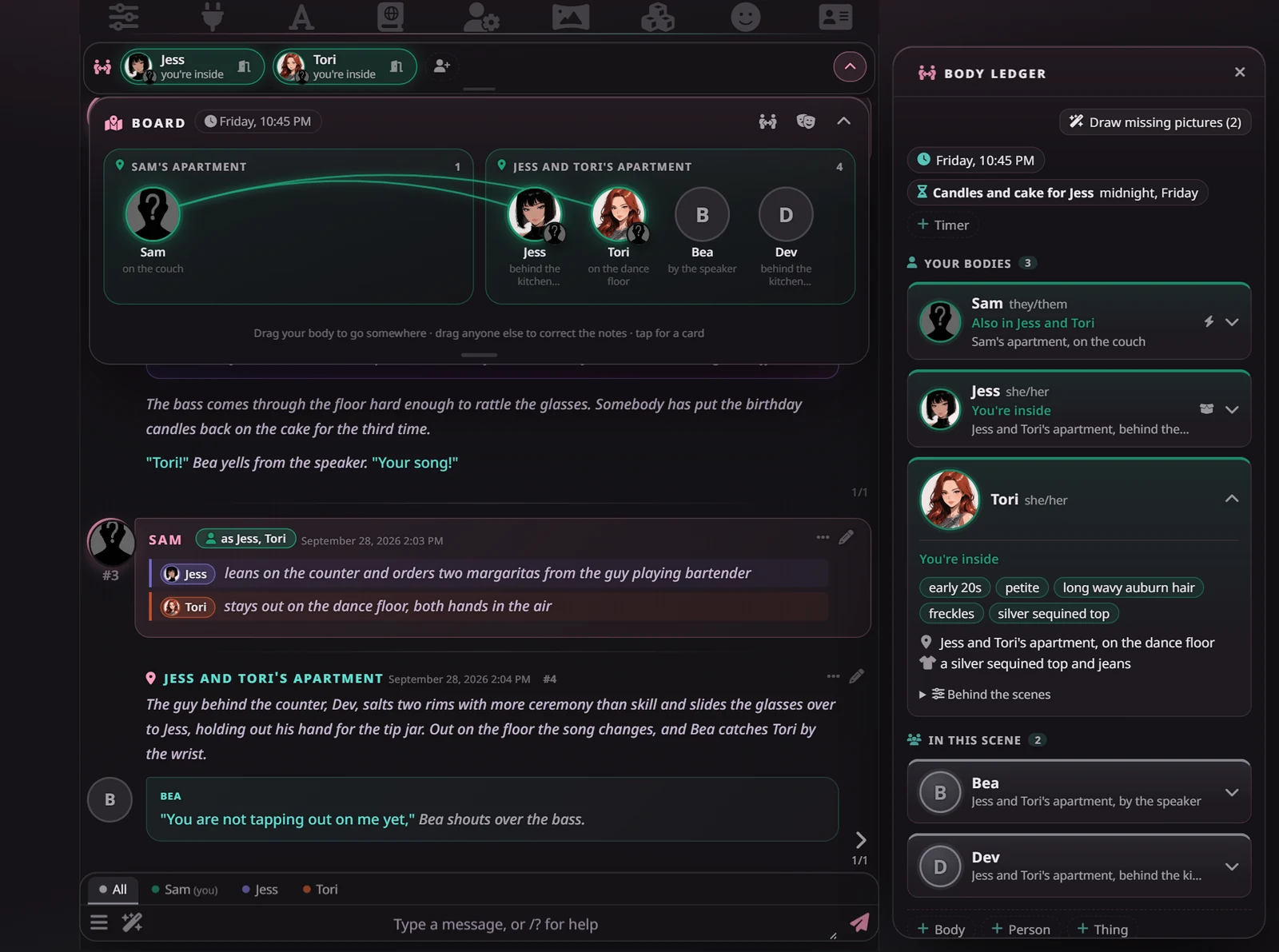
New in 2.0: Stage mode, a new look for all of SillyTavern with a Board of who is where · World notes · card rules you set with a tap · quick actions to possess and release from the strip · one card per person, every part editable · and Test this card and Check the greetings.
Only what you're into. Every mode is opt-in, picked per character, and nothing is on until you pick it. Pick Mind Control and that's all you'll get: no possession rules, no body swaps, and no boxes or cards for modes you didn't choose. Mix as many as you like, and change them any time.
In SillyTavern, open Extensions → Install extension, and paste:
https://github.com/Coz-rp/SillyTavern-Worldhopper
Then open Extensions → Worldhopper Engine → Settings → Models and pick a connection profile for each job: a local or cheap, fast model, not your roleplay model. Tested on SillyTavern 1.18. Source and README on GitHub ↗
On Lumiverse? The Engine has a Lumiverse version too (1.0.0), with the same Codex modes, Body Ledger, Mind Book, checks, and Check card; Stage mode and the rest of 2.0 are SillyTavern-only for now. In Lumiverse, open Extensions → Add Extension, paste the same URL under Install from Source, and set Branch to lumiverse.
Then open the Worldhopper tab in the drawer → Settings → Models and pick a connection for its jobs. Installed that way, Lumiverse's Update button keeps it current. You can also download it, unzip it into Lumiverse's data/extensions folder, and press Import Local, but a copy installed that way won't update itself. Source and README on GitHub ↗
Keep it fast and cheap. Give the Engine its own model, separate from the one you roleplay with. Its jobs are small, and the Ledger runs after every reply, so a local model (KoboldCpp, Ollama, and the like) or a cheap, fast API model (Flash, Haiku, or mini tier) does them well for next to nothing. Your big roleplay model would work too, but at big-model prices, and your next reply would wait for it.
Stage mode: the Board of who is where, pulled down over the chat, and the Body Ledger as a sheet.
Stage mode
An optional new look for all of SillyTavern. The story reads as narration with each speaker's face beside their lines, dividers keep the story's time, and a Board shows who is where. Off until you switch it on, with or without Moonlit Echoes.
World notes
Kept beside the Ledger after every reply: things that matter and who holds them, who knows what about the powers, where everyone is and what they have on, and the story's clock.
Card rules
How a card's power works, as a few taps instead of paragraphs: how the rider gets in, whether the host is awake inside, what they remember after. It can read them from the card and trim the prose they replace.
Codex modes
21 modes, from possession and skinsuits to hypnosis, mind control, dolls, and time stop. Their rules switch on only in the chats that use them, from a lorebook the Engine installs and keeps updated.
Body Ledger
In possession-type chats, a model you choose records after each reply who is in which body and whether you know, then feeds it back so nothing slips. Everyone gets a card, and every part of it can be edited.
Mind Book
Hypnosis, mind control, and altered perception each keep their own record: trance stages, suggestions, and triggers; what a controller set in someone's will; who can't perceive whom. A trigger word you say fires on cue.
Strip and tabs
Every borrowed body at a glance above the chat, with a tap to possess or release. Run several at once and the message box gets a tab per body: write in it as "I", and it's that body doing it.
Moment boxes
A takeover, an absorption, someone going under, a will taking hold, time stopping: each mode's big moment gets its own styled box in the chat.
Card tools
Make card turns a Card Builder chat into a character, modes and all. Check card reviews any card, and can test its first replies and every greeting.
WH Editor 1.2.0. Its own extension now, and it works with any setup: a rule pass flags stock phrases, "not X, but Y" framing, and chopped dialogue, and a cheap model rewrites only those lines. One tap brings the original back. Get it on GitHub ↗
In the chat
DanaMarcus insideKimyou're inside
Marcus
Dana turns from the window, halfway through telling you about her day.
Mid-word, she stops. Her eyes lose their focus for a heartbeat and her whole body gives a small jolt. Then she blinks, rolls her shoulders, and drops onto the couch beside you.
Where was I?she asks.
In the chat: several bodies at once
Sam as Jess, Tori
Jessleans on the bar and orders two margaritas
Toristays out on the dance floor, both hands in the air
Narrator
The bartender sets two glasses in front of Jess and holds out the card reader. Out on the floor the song changes, and Tori's friend Bea catches her by the wrist.
You are not tapping out on me yet,Bea shouts over the bass.
AllSam (you)JessTori
I tip the bartender and slide a margarita over to Tori
A tab per body on the message box, each with its own draft; Send sends them all. Bodies you give nothing stay exactly as you left them.
In the chat: mind control
🧠Verayour control
Sam
Across the meeting table, I catch Vera's eye and decide she wants me to have Friday off.
Narrator
Vera stops halfway through the budget slide, struck by how obvious it is, and turns to you with a quick, decisive nod.
Before I forget: take Friday. You've earned it, and I'd rather have you rested for the launch.She's already typing it into her calendar, pleased with herself for thinking of it.
She wants it and argues for it in her own words, with nobody trapped inside. The Mind Book keeps what you set and any trigger you planted, and its bar above the chat shows who is under whose control.
Your chats stay yours. The Engine sends chat text only to the connection profiles you pick, and there's no telemetry. Optional: the repo also includes a small Windows server plugin that adds Shut down SillyTavern to the wand menu, for switching it off from your phone. Setup ↗
Card Builder · 1.1
Metaphysics Card Builder
A character that builds metaphysics cards with you, one piece at a time: description, first message, greetings, post-history, lorebook, and tags. Hand it a one-line hook, a full brief, or an existing card to fix.
1. Import it
Characters → Import, then pick the file. Import the WH Cardmaker preset too, and select it while you build.
2. Build together
It asks only what matters, writes each piece, and waits for your edits or a "next".
3. Make card
With the Engine installed, Make card in the wand menu turns the finished chat into a real character with its modes set.
You normally need none of this: the presets carry their regex, and the Engine installs its own. If styled texts or possession boxes don't show up, import these under Extensions → Regex → Import. Importing a script you already have does no harm.
37 scripts
Preset pack
Tag cleanup, tracker pruning, the scene clock, the folded plan, and the styling for in-world texts, computer screens, emails, posts, papers, signs, and notes.
Five minutes, start to finish. You'll need SillyTavern connected to a Chat Completion source (Anthropic, OpenRouter, NanoGPT, Google AI Studio, and the like).
Import a preset. Open AI Response Configuration (the sliders icon), choose Import, and pick the file. When SillyTavern asks whether to allow the preset's regex, allow it. Pick your model as usual; the preset won't change it. In the connection settings, set Prompt Post-Processing to Semi-strict (no tools).
Install the Engine. Extensions → Install extension, paste https://github.com/Coz-rp/SillyTavern-Worldhopper. Then, under its Settings → Models, give it its own model, separate from your roleplay one: a local model or a cheap, fast API model keeps everything quick and costs next to nothing.
Pick a character's modes. Open a character and tap the pen under Modes, or let the wand suggest some. Every section of the Engine's panel has a (?) that explains it in a few lines.
Optional: the Card Builder. Import it, build a card with it, then use Make card from the wand menu.
About
Hey, I'm Coz
I write metaphysics bots: possession, mind control, and every other way a body or a mind can change hands. I kept spending more time fixing how models handled them than writing the bots themselves, so I built Worldhopper to do the fixing. It's free, and you're welcome to pull it apart and make it your own.
Fair warning: this is adult fiction about control, so consent on the page gets bent and broken. Every mode is opt-in, though, so you only ever get what you've chosen.
My bots are on Chub and Botbooru. If there's a character you want and nobody's made it yet, send me a request.